Why your LLM chat is slow: fixing time to first token
A small model took 5.5 s to answer a one-line question. How to measure time to first token, the four usual causes, and the fixes that get it under 1.5 s.
- #LLM Latency
- #Time to First Token
- #Streaming
- #AI/ML Engineering
Short answer: when a small model takes five seconds to answer, the model is rarely the problem. The time usually goes to reasoning that’s on by default, checks that run as extra round trips before the model is called, cold starts, and streaming that gets buffered before it reaches the user. Fixing those four gets the first visible word under 1.5 seconds.
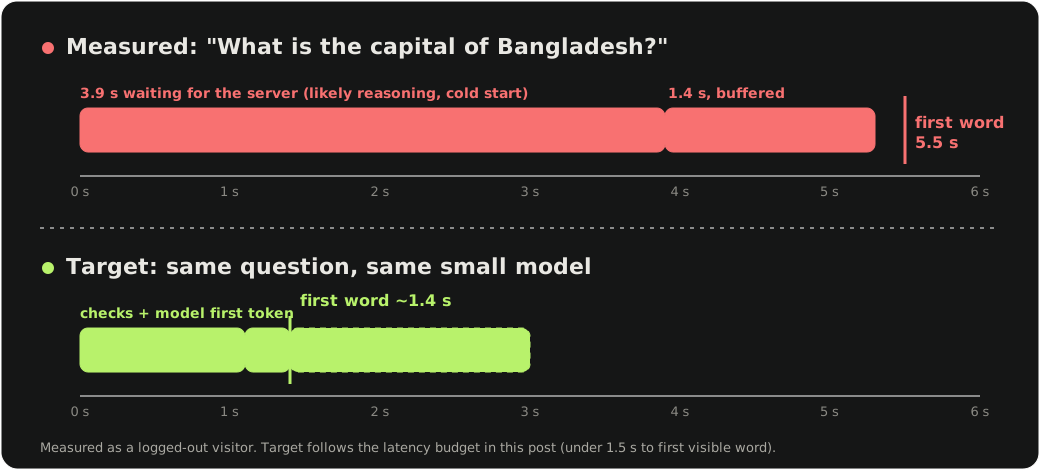
We recently tested a consumer AI chat app as an ordinary visitor. We asked it one question: “In one short sentence, what is the capital of Bangladesh?” The app routed the request to a small, cheap “nano” class model. The answer, “Dhaka”, appeared on screen about five and a half seconds later.
Small models are fast. Five seconds of nothing, followed by the whole answer appearing at once, is almost always an architecture problem, and a common one. Users read that silence as “broken”, and they leave.
For comparison, the multi-provider platform we run for Lipika AI has a median time to first token of 1.4 seconds across four providers (p50, measured server-side). None of that comes from a faster model. It comes from removing the seconds that sit around the model.
How to measure time to first token in ten minutes
You can find most of this with your browser’s developer tools.
- Open the Network tab and send a short message.
- Find the chat request (often something like
/api/chat) and look at its timing: waiting for server response (time to first byte) and content download. - Watch the screen at the same time. Does text appear while the request is still downloading, or only after it finishes?
- Note every other request your app fires per message: queue checks, usage checks, database writes.
In the app we tested, the numbers looked like this:
| What we measured | Short question | 6-item list |
|---|---|---|
| Server wait before first byte | 3.9 s | 3.7 s |
| Request complete | 5.3 s | 5.6 s |
| Text first visible on screen | ~5.5 s | ~5.2 s |
Two things stand out. Almost four seconds pass before the server sends anything. And the text appears in one burst at the very end of the request: after it finished for the short question, and only a few hundred milliseconds before for the list. Whatever streaming happens on the server barely reaches the user.
We could only see this from the outside, so we can’t say exactly how those four seconds split. But the pattern fits the four causes below.
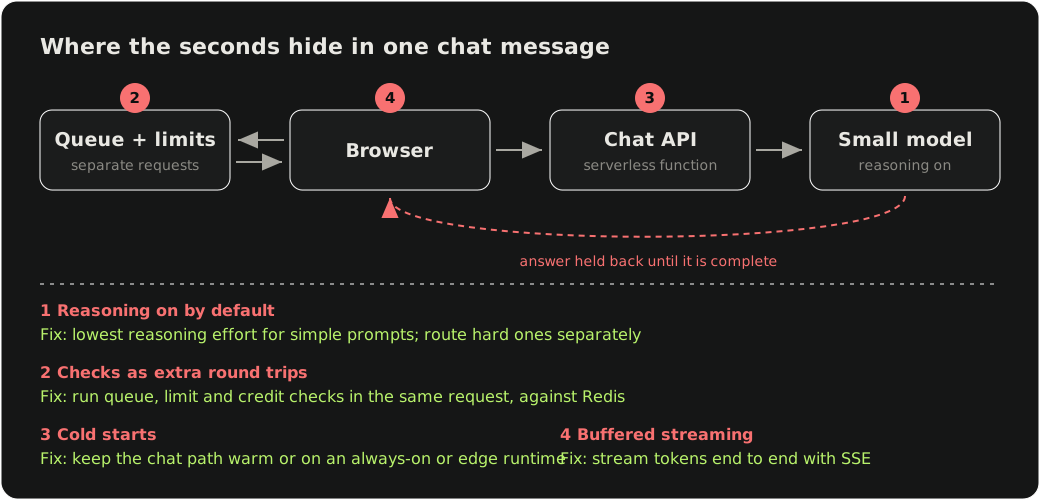
The four causes of slow LLM responses
1. Reasoning is on when it doesn’t need to be
Many of today’s small models are reasoning models. They think before they answer, and by default they think even for “what is the capital of Bangladesh”. On a short prompt, that hidden reasoning can easily be most of your latency.
Fix: set the lowest reasoning effort your provider allows for ordinary chat, and only raise it for prompts that need it (maths, code, multi-step questions). A cheap classifier, or simple rules on prompt length and intent, is enough to route between the two.
2. Checks run before the model call, one round trip at a time
Every message in the app we tested also made two separate “queue” requests from the browser, one taking about 1.4 seconds, plus several database writes. Rate limits, credit checks and queue positions are all reasonable to have. Running them as sequential network round trips in front of the model call is not.
Fix: do the checks inside the same request, against a fast key-value store such as Redis, in a few milliseconds. Write chat history after you start streaming, not before. If you also bill per tool call, our note on credit metering inside a LangGraph agent shows how to keep billing correct without adding round trips.
3. Cold starts
Serverless functions that sleep between requests can add hundreds of milliseconds to seconds on the first call. Chat traffic is bursty, so many users hit a cold function.
Fix: keep the chat path warm, use an edge or always-on runtime for it, and keep its bundle small so it boots fast.
4. Streaming that stops halfway
Plenty of apps stream from the provider to their server and then buffer the full answer before sending it to the browser, or buffer it in the frontend before rendering. The user gets none of the benefit.
Fix: stream end to end. Server-Sent Events from your API to the browser, with the frontend appending tokens as they arrive. Make sure nothing in between (compression middleware, a proxy, a framework response helper) is buffering the stream. On Lipika, for example, we bypass GZip on the streaming path for exactly this reason.
What a good latency budget looks like
| Stage | Target |
|---|---|
| Checks and routing before the model call | under 100 ms |
| Model time to first token (small model, minimal reasoning) | under 1 s |
| Network and rendering of the first token | under 300 ms |
| Time to first visible word | under 1.5 s |
None of these fixes needs a bigger model or a bigger bill. Two of them (less reasoning and fewer round trips) usually make each message cheaper as well as faster.
Checklist
- Measure time to first byte and time to first visible word for a one-line question
- Turn reasoning down for simple prompts and route hard ones separately
- Collapse queue, limit and credit checks into the main request, backed by Redis
- Write history after streaming starts
- Keep the chat function warm, or move it to an always-on or edge runtime
- Stream from provider to browser with no buffering in between
FAQ
What is a good time to first token for an LLM chat app? Aim for the first visible word in under 1.5 seconds for a short question. Keep checks and routing under 100 ms, the model’s first token under 1 second, and network and rendering under 300 ms.
Why does a small, fast LLM still take several seconds to respond? Usually not because of the model. The common causes are reasoning turned on by default, rate-limit and queue checks made as separate round trips before the model call, serverless cold starts, and streaming that is buffered on the server or in the frontend so the user sees nothing until the answer is complete.
How do I measure time to first token in my app? Open your browser’s developer tools, send a short message, and check the chat request’s time to first byte and download time in the Network tab. At the same time, note when the first word appears on screen and list every other request fired per message.
Does lowering reasoning effort reduce quality? For simple chat it rarely matters, and it removes seconds of hidden thinking. Route maths, code and multi-step questions to higher reasoning effort, using simple rules or a cheap classifier.
If your AI product feels slower than the model behind it, we’re happy to take a look. We built and run the backend for Lipika AI: 99.98% of requests served with no server error, and a 1.4-second median time to first token.