Why is your AI chatbot slow? The first-word test and 5 fixes
A slow AI chatbot loses customers. Test your chatbot response time in 30 seconds, learn the 5 usual causes, and the fixes that get the first word under 1.5 s.
- #AI Chatbots
- #Chatbot Response Time
- #LLM Latency
- #Streaming
- #Customer Experience
Short answer: open your AI chatbot, ask a one-line question, and count the seconds until the first word appears. Under 1.5 seconds feels fast. In our experience, past about 2 seconds people start to wonder whether it is working. When a chatbot fails this test, the AI model is rarely to blame. The seconds are usually lost in the steps around it, and most of them can be won back without changing the model at all.
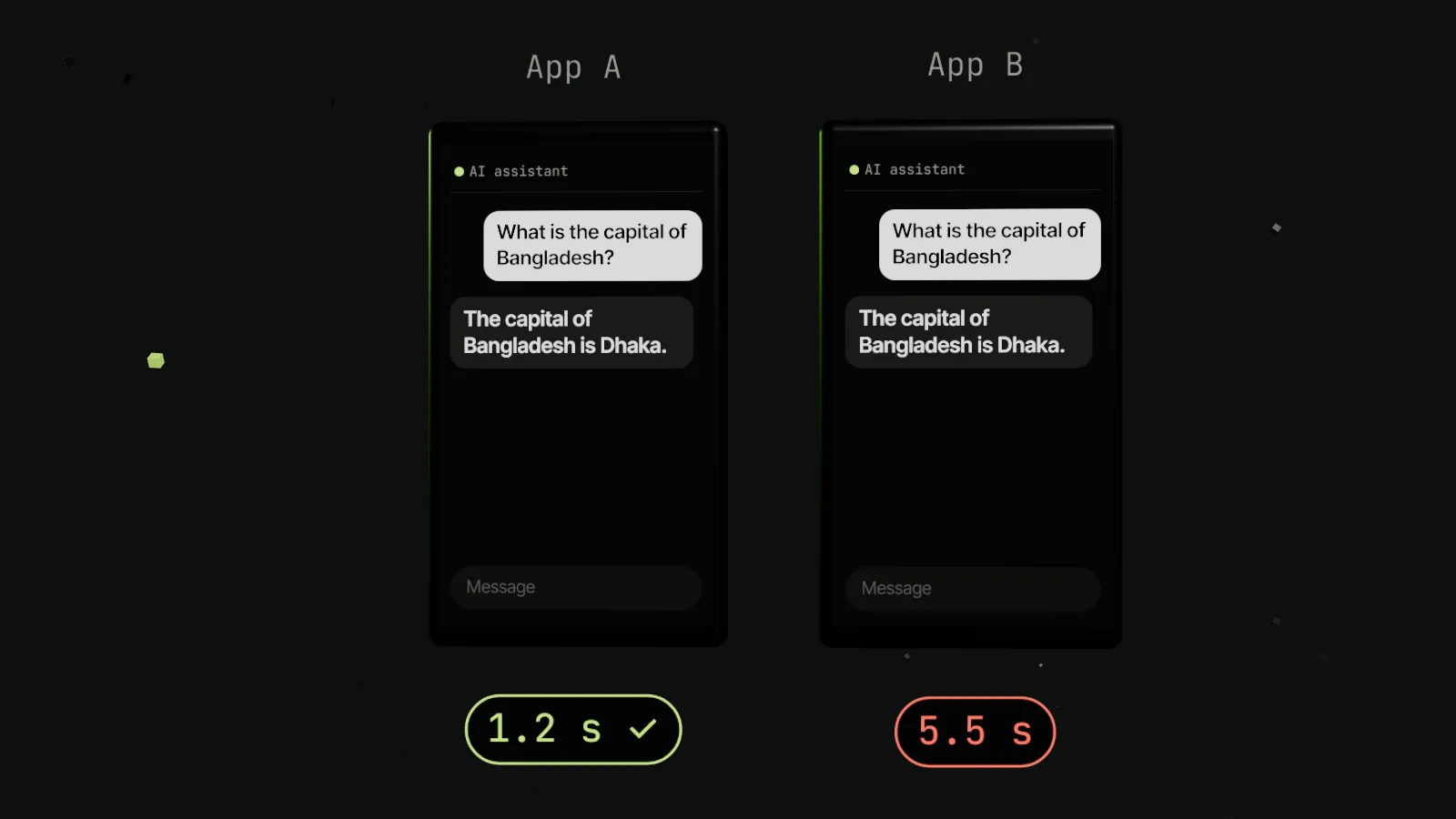
Same question, same AI, two very different apps
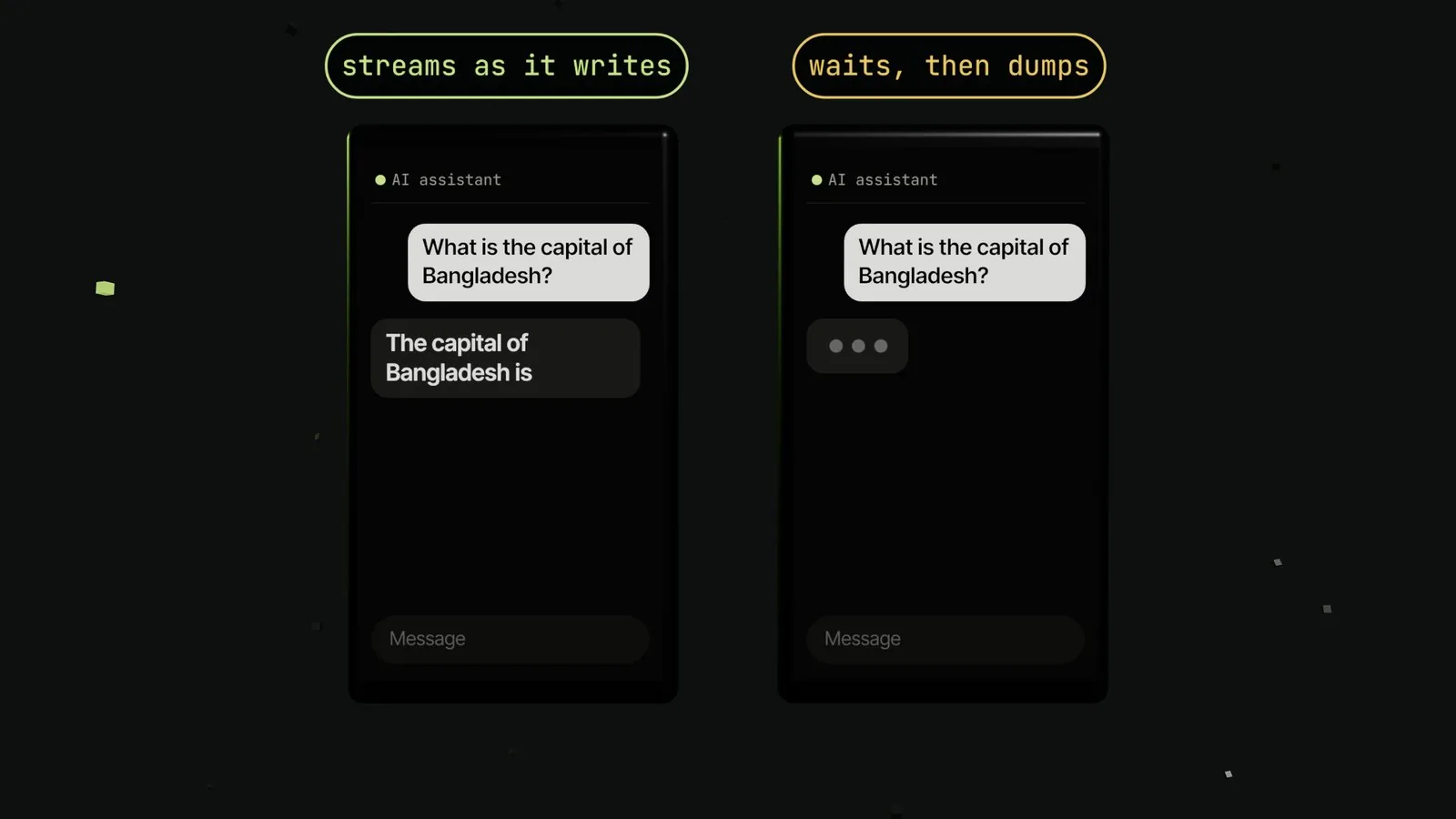
Picture two chat apps. Both use the same AI model. A customer asks both of them the same question: “What is the capital of Bangladesh?”
App A starts answering in 1.2 seconds. “The… capital… of…” The words stream in, and the short answer is complete well before the 2-second mark.
App B shows three dots. Then more dots. At 5.5 seconds the full answer appears in one go.
The answers are identical. App A is finished before App B shows anything. The model behind both is the same, so the extra four seconds in App B come entirely from how the app around it is built. On a longer answer streaming matters even more: App A’s customer is reading from the first second, while App B’s customer is still watching dots.
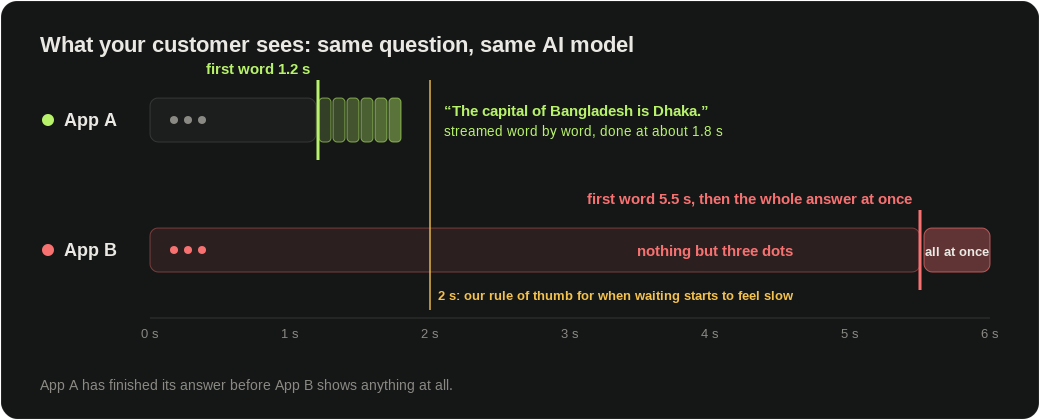
That is the whole idea behind the first-word test. People don’t judge a chatbot by when it finishes. They judge it by when it starts. Engineers call this number time to first token; your customers just call it “slow” or “fast”.
How fast should an AI chatbot respond?
Watching three dots is not neutral time. The longer the silence, the more likely a customer is to wonder whether the message went through, tap again, retype the question, or simply leave.
The research on response times goes back decades. Jakob Nielsen’s three response-time limits put it simply: about one second keeps a person’s train of thought, and anything well past that needs feedback or attention drifts. A streamed first word is that feedback. It tells the customer “I heard you, here it comes”, and the rest of the answer can take its time.
From that research and our own testing, we use a simple rule of thumb: aim for the first word in under 1.5 seconds, and treat anything past about 2 seconds as worth fixing. It isn’t a hard law, but it is a useful line to measure against.
This matters most where the chatbot is doing real work for the business: support questions, booking, product questions before a purchase. A slow first word there doesn’t only feel bad. It turns into abandoned chats and support tickets that the bot was supposed to prevent.
How to test your chatbot’s response time in 30 seconds
You don’t need a developer for this. You need your phone and a stopwatch.
- Open your own chatbot the way a customer would, ideally on mobile data, not office Wi-Fi.
- Ask a short, simple question, the kind your customers really ask. “Do you deliver on Sundays?” works well.
- Start the stopwatch when you tap send. Stop it the moment the first word shows, not the whole answer.
- Do it three times. Make one of them the first message after the app has sat idle for an hour.
- Finally, ask one question with a long answer, such as “How do returns work?” Watch how the answer arrives: word by word, or all at once after a wait. A short answer looks the same either way, so this is the only way to see whether your chatbot streams.
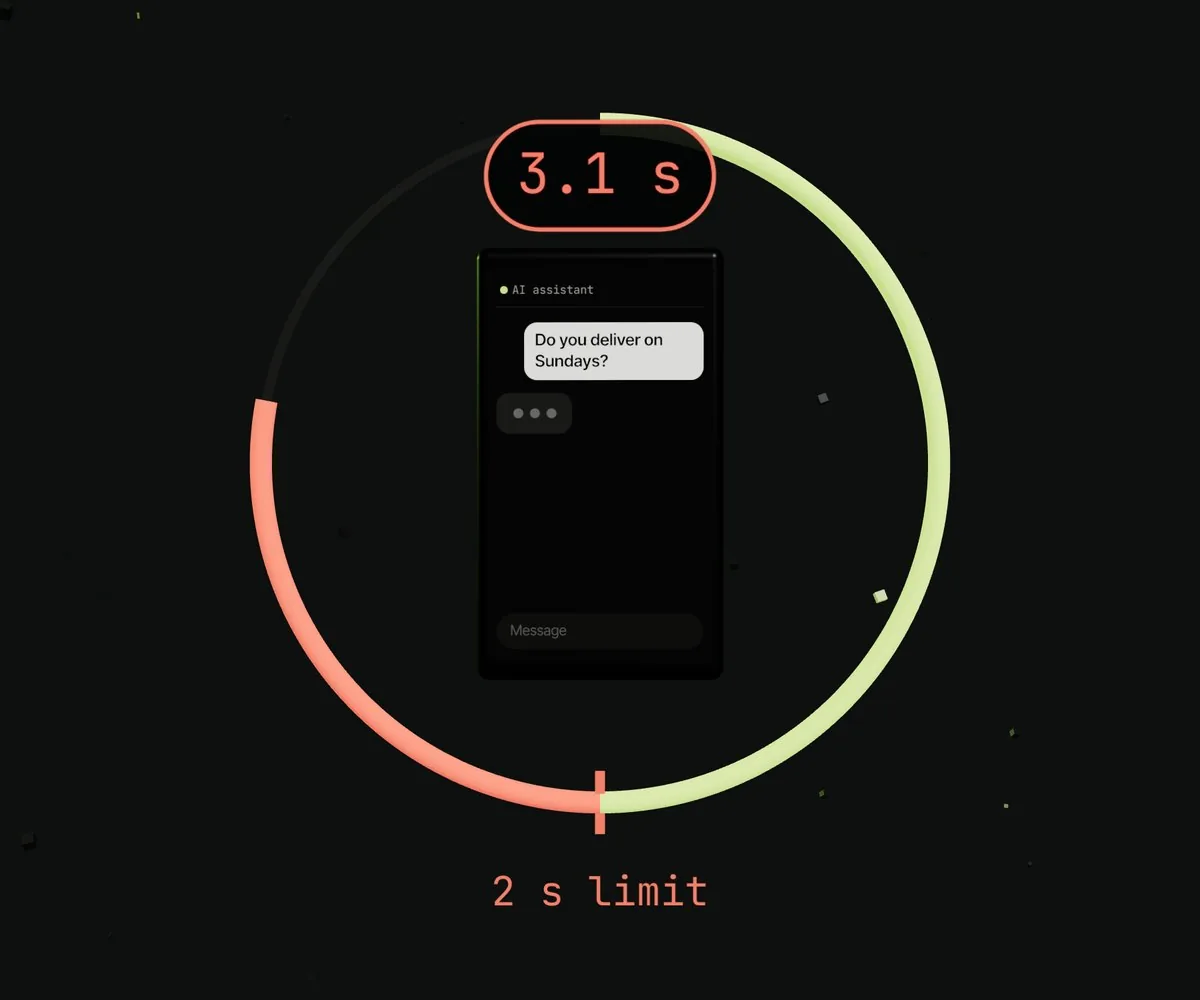
Then read your result:
| What you saw | What it means |
|---|---|
| First word in under 1.5 s | Great. This feels quick. |
| 1.5 to 2 s | Fine, with some room to improve. |
| Over 2 s | Past our rule of thumb. Worth asking your team where the time goes. |
| Long answer: nothing, then the whole answer at once | Streaming is off or blocked somewhere. This one is usually the quickest win. |
| Fast normally, slow after idle | Your servers are going to sleep. See “Wakes up cold” below. |
Why is my AI chatbot slow? Five common causes
Between the customer’s tap and the first word, a message makes a short trip: from the customer to your app, from your app to the AI model, and back. Time leaks out at five common points.
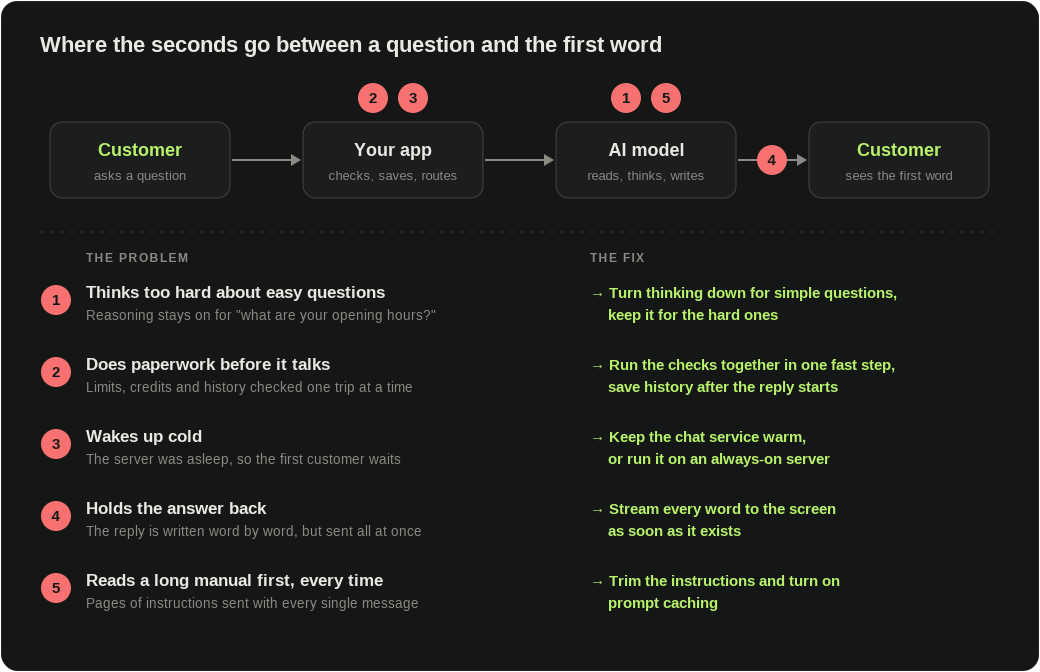
1. It thinks too hard about easy questions
Many modern AI models can “reason” before they answer, working through the problem privately first. That is great for a tricky refund calculation. It is wasted time for “what are your opening hours?”. If reasoning is switched on for everything, every customer pays a few seconds of hidden thinking on every question.
The fix: keep thinking low for everyday questions and save it for the hard ones. Simple rules or a small, cheap check can decide which is which before the main model is called.
2. It does paperwork before it talks
Before the AI is even asked, many apps run a list of checks: Is this user signed in? Are they over their limit? Do they have credits? What did they say last time? Save this message. Each check is quick on its own. The trouble is when they run one after another, each one a separate trip across the internet. Five trips of 300 ms each is a second and a half gone before the AI has seen the question.
The fix: run the checks together, in one fast step close to where the app runs, and leave anything that can wait, like saving the conversation history, until after the answer has started streaming.
3. It wakes up cold
To save money, many apps run on servers that switch off when nobody is using them. The first customer after a quiet spell has to wait for the server to wake up and load everything again. That can add one to several seconds, and it tends to hit at the worst times: early morning, late night, right after you’ve shared a link.
The fix: keep the chat service warm, or run it on a server that is always on. For most businesses the cost difference is small next to the customers it keeps.
4. It holds the answer back
This is the most common one, and the most painful, because the model is writing word by word. Somewhere along the way, though, something collects all of the words and only passes them on when the answer is complete. It might be the server code, a proxy or firewall in between, or the chat screen itself. The customer gets dots, then a wall of text.
The fix: stream every word straight through to the screen as soon as it exists, and check each layer in between so none of them waits for the full answer.
5. It reads a long manual first, every time
Many chatbots send the AI a long set of instructions, product details and policies with every single message. The model has to read all of it before it can write a word. The longer that “manual”, the later the first word.
The fix: trim what goes in front of every message to what actually matters, and use your AI provider’s prompt caching so the unchanging part doesn’t have to be processed from scratch each time.
What doesn’t make a chatbot faster
A few fixes sound sensible but rarely help on their own:
- A bigger or more expensive model. Larger models are often slower to start writing. If the delay is in your app’s steps, a new model changes nothing.
- More servers. If the checks run one after another, more servers just run the same slow chain in more places.
- A fancier loading animation. It helps a little for a second or two. It doesn’t stop people leaving at five.
What to ask your developer or vendor
If your chatbot failed the test, these five questions get to the cause quickly, and none of them need you to read code:
- “Is reasoning or ‘thinking’ turned on for every question, even simple ones?”
- “How many separate steps happen before the AI is called, and do they run one at a time?”
- “Do our chat servers go to sleep when they’re idle?”
- “Is the answer streamed all the way to the customer’s screen, or collected first?”
- “How long are the instructions we send with each message, and are we using prompt caching?”
A good team will have clear answers, and usually a quick plan for whichever one is the culprit.
For the technical team: a time to first token budget
If you’re the one fixing it, aim for a budget like this for a short question:
| Stage | Target |
|---|---|
| Auth, limits and routing before the model call | under 100 ms |
| Model time to first token (small model, minimal reasoning) | under 1 s |
| Network and rendering of the first token | under 300 ms |
| Time to first visible word | under 1.5 s |
It is achievable in production. On a multi-provider AI platform we built and run, the median time to first token is 1.4 seconds across four AI providers (p50, measured server-side; the word reaches the screen a little after that). None of it comes from a faster model; it comes from removing the seconds that sit around the model.
A quick checklist:
- Measure the time to the first visible word, not just the server response time
- Turn reasoning down for simple prompts and route hard ones separately
- Combine pre-call checks into one request, backed by a fast store like Redis
- Write chat history after streaming starts
- Keep the chat service warm, or move it to an always-on runtime
- Stream from the provider to the browser with no buffering in between
- Trim the system prompt and turn on prompt caching
We cover the measurement and each fix in more depth, with numbers from a real app, in Why your LLM chat is slow: fixing time to first token.
FAQ
How fast should an AI chatbot respond? Aim for the first word in under 1.5 seconds for a short question. Research on response times shows that around one second keeps a person’s attention without a break. Our own rule of thumb is that past about 2 seconds of silence, people start to wonder whether the app is working.
Is a slow chatbot caused by a slow AI model? Rarely. Most of the delay sits around the model: reasoning switched on for simple questions, checks that run one after another before the model is called, servers that start cold, answers that are held back until they are complete instead of streamed, and long instructions the model has to read before every reply.
Will switching to a bigger or more expensive model make my chatbot faster? Usually not. Bigger models are often slower to start writing. If the delay comes from your app’s own steps, a different model changes nothing.
What is streaming in an AI chatbot? Streaming means each word is sent to the screen as soon as the model writes it, the way a person types. Without streaming, the customer stares at three dots until the whole answer is ready, then sees it all at once.
How do I test my own chatbot’s speed? Open it on your phone, ask a one-line question such as “Do you deliver on Sundays?”, and time how long it takes for the first word to appear. Repeat it three times, including once after the app has been idle for a while.
Run the test on your own chatbot this week. If the first word takes longer than you expected and you’d like a second pair of eyes on where the seconds go, we’re happy to take a look.